
Frequently asked questions
Short answers to the questions asked most: accounts, supported sites, privacy, how counts work, and what to do when something breaks.
No questions match that search.
About Emojery
What is Emojery?
Emojery is a browser extension that adds an emoji-reaction button to many websites. You react with any emoji from a full palette, and you see aggregate counts of how everyone else reacted to the same page, post, or item. The counts are public, the identities behind them are not.
Is it free?
Yes. The extension is free to install and free to use, with no paid tier: every feature is available to every user, and the server costs are covered by donations. The one paid thing on the roadmap is the planned data API, a separate product for developers who want bulk aggregate counts. It changes nothing about the extension.
Is it open source?
Yes. The extension code is licensed under GPL-3.0. The source lives on GitHub. You can read the code, build it yourself, file issues, and send pull requests.
Is the store version safe? Does it match the source code?
Store releases go through the stores' own review before they are published: the Chrome Web Store and Mozilla Add-ons both examine new submissions and updates. The extension's full source is public under GPL-3.0 on GitHub, so what it does is open to inspection rather than taken on faith.
If you'd rather not rely on a store build at all, you can build and install it from source and run a copy you compiled yourself.
Who builds Emojery?
A solo developer. There is no parent company, no investor, and no advertiser relationship. The project is funded by donations and operated to break even on infrastructure.
Using it
How do I add a reaction?
Open any supported page. A reaction button appears next to the site's existing action row — a single 🙂 until someone reacts, then the top 3 emoji and the running total. Click it, pick an emoji (or type a word to search), and you're done. The picker opens with your recently used emoji and a Popular row, so common choices are one tap away. Screen readers announce the button as “Add reaction”. React to a post walks adding, changing and taking one back, click by click.
What is the "Popular" row in the picker?
Near the top, the picker shows a Popular row so the emoji people reach for most are one tap away. It reflects a community trend: which emoji the whole Emojery community is using most. It counts everyone who has ever reacted, aggregated across all supported sites and refreshed daily, so the set and its order shift over time.
Can I change my reaction?
Yes. Click the picker again and choose a different emoji. The previous one is removed from your record and the counters update accordingly. Only one reaction per item per account.
Can I remove my reaction entirely?
Click the same emoji you already picked, or use the picker's highlighted entry to toggle it off. Removing it decrements the aggregate count by one.
Can I press the site's native Like automatically using only the Emojery button?
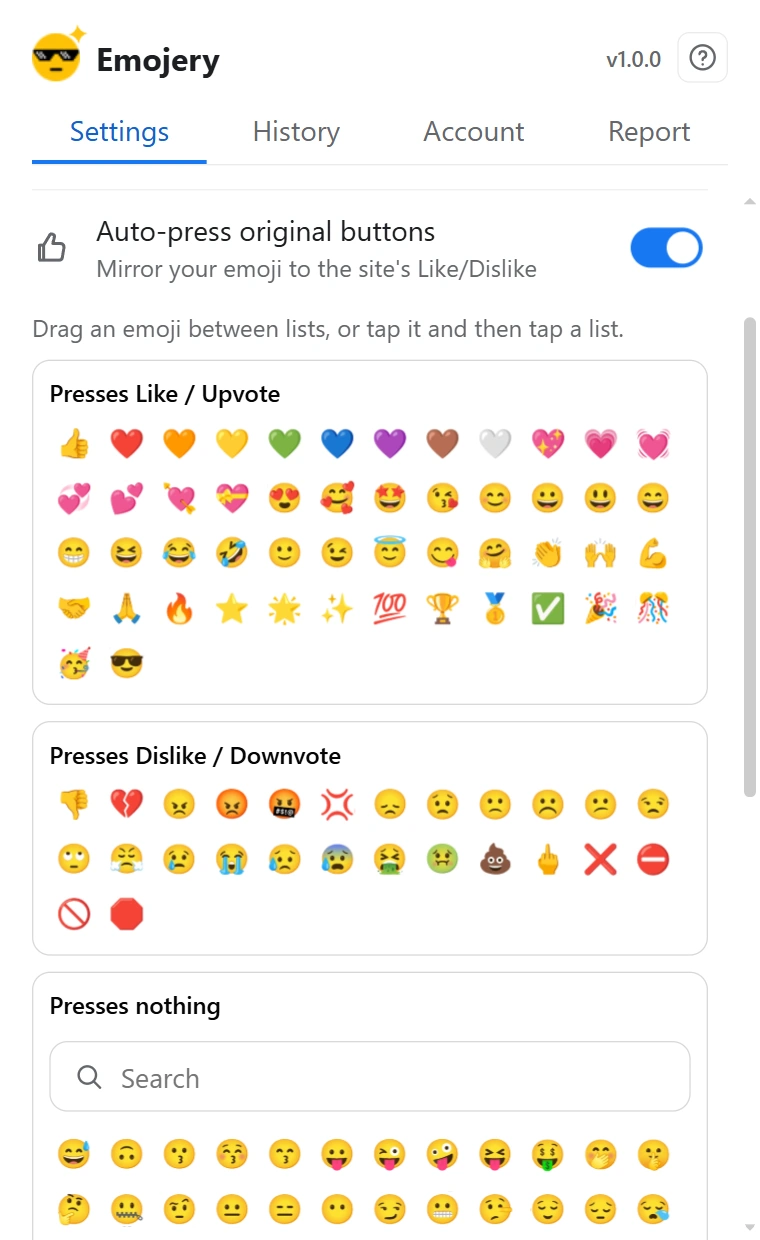
Yes, and that is exactly what the off-by-default Auto-press original buttons setting does. With it on, picking an emoji also presses the site's own control: a positive emoji presses Like, upvote, or Star, a negative one presses Dislike or downvote where the site has one, and a neutral emoji presses nothing. Which emoji count as positive, negative, or neutral is fully yours: the popup shows 3 lists you rearrange by dragging emoji between them (or by tapping an emoji and then a list). Un-reacting releases only what the extension itself pressed; a button you pressed by hand is never touched. Auto-press the original buttons covers turning it on and deciding which emoji press what.
Does Auto-press map my emoji to Facebook's Love, Haha, Wow, Sad or Angry?
Yes, one to one where an exact match exists: 👍 sets Like; every heart (❤️ 🧡 💛 💚 💙 💜 🤎 🤍 💖 💗 💓 💞 💕 💘 💝 💟 ❣️) and 😍 set Love; 🤗 🥰 set Care; 😆 😂 🤣 😄 😁 😅 set Haha; 😮 😯 😲 😱 🤯 set Wow; 😢 😭 😥 😰 💔 set Sad; and 😡 😠 🤬 💢 set Angry. A positive emoji with no exact match presses plain Like; a negative one with no match presses nothing (Facebook has no dislike). The native reaction is picked by its position in Facebook's menu rather than its label, so it works in every language.
What does Auto-press do with a negative emoji on a site that only has a Like?
Nothing: there is no dislike to press on Instagram, X, Threads, GitHub, or GitLab, so a negative emoji leaves the native controls alone there. If the extension had auto-pressed a Like for you earlier and you switch to a negative or neutral emoji, it releases that Like again. On YouTube and Reddit, which do have a negative control, a negative emoji presses Dislike or downvote.
Is Auto-press safe for my platform accounts?
It behaves like you: one emoji pick maps to at most one native press on the page you are looking at, under the account you are already signed in with, the same thing that happens when you click the button yourself. There is no background automation, no bulk actions, and the setting is off until you turn it on. Keep in mind the presses are real: an auto-pressed Reddit downvote affects karma and ranking exactly like a manual one.
Where do my reactions show up?
Can I react on private pages?
No. Emojery is for public, addressable content only. The extension does not offer reactions on private pages such as private repositories, private projects, closed groups, private accounts, or other pages that an anonymous visitor cannot view.
Can I search for an emoji by name?
Yes. The picker has a search bar that matches Unicode CLDR labels and tags. love, amour, and 愛 all find ❤️; fire finds 🔥; idea finds 💡. Search works in the same language your browser is set to. Find an emoji collects the search tricks that save the most scrolling.
Can I use the picker with a keyboard?
Yes. You can move through choices with the keyboard, pick with Enter or Space, and close the picker with Esc. Screen readers are told when the picker opens and what is selected.
Can I disable Emojery on a specific site?
Yes. Turn on "Only selected sites" in the popup and every supported site gets its own toggle, on top of the global "Enabled" switch. Disabling a site hides the picker there without uninstalling the extension. Turn Emojery off on one site walks both switches and says which one to reach for.
What does the number on the Emojery toolbar icon mean?
It counts the Emojery buttons that appear on the current page as you open and scroll through it. The number only goes up while you stay on the page: it does not drop when posts scroll out of view, and it resets when you open another page. It is neither a tally of the reactions you have made nor an unread-notification count, and not the total number of reactions from everyone. On sites Emojery doesn't support, the toolbar icon is gray and shows no number. Pin the toolbar button puts the icon where you can read that number without hunting for it.
Account & sign-in
Why do I need to sign in to react?
So one account counts as one vote. Reading reactions requires no account and sends no identifier; only submitting one needs an account a provider vouched for, which is what makes the counts meaningful instead of botted. The full reasoning is on How sign-in works.
Why sign in with a provider — why not email or a device ID?
Because a provider sign-in is something a public proof can be built on. The provider signs the sign-in, and Emojery turns that signature into a zero-knowledge proof in the public log that the account is real, without naming it. An emailed code proves something only to us; a device ID proves nothing and can be made by the thousand. The provider learns that you signed in to Emojery and nothing after that: never which pages, never which reactions.
What do you store about my account?
A keyed hash of the opaque id your provider assigns you, and the provider's name. Your name, email address and picture are never stored because they are never requested: the sign-in asks for the standard openid scope and nothing else. The key that produces the hash is held outside the database, so a stolen copy of it yields no ids and cannot be tested against a guessed provider account. We hold that key, so we can check whether a provider account you name has an Emojery account, which is what an access or deletion request needs.
How does sign-in work?
Pick 1 of the 4 providers (Google, Apple, Microsoft, Twitch); its own sign-in window opens; approve there and you're signed in. No password on Emojery's side, no code to type, and no email: the request asks the provider for the standard openid scope only. The session lasts 30 days; when it expires, the next reaction reopens the sign-in tab. Sign in with a provider walks the whole flow, including what each message means when the provider window closes without signing you in.
Do I need to reload after signing in or out?
No. After you sign in or sign out, open tabs update by themselves. The picker and counters refresh automatically, so you normally do not need to reload the page.
Can I use a throwaway provider account?
Yes. A throwaway account at a provider is still a provider account, and it gets 1 Emojery account like any other. What it cannot do is vote more than once: 1 provider account is 1 Emojery account is 1 reaction per item, and every account's enrollment is a public entry in the log, so a burst of fresh accounts behind one count is visible to anyone who recounts. The catch is yours: lose the provider account and you lose the only way back into the Emojery account.
How do I sign out?
Open the extension popup → Account → Sign out. Your local session is cleared immediately; your past reactions and counters are untouched.
How do I delete my account?
Popup → Account → Delete. Your account record is erased, every reaction you submitted is reversed out of the aggregate counters, and your local session is cleared. Deletion is immediate and irreversible: there is no queue, no review, and no soft-delete. What stays is the append-only log: your past entries there are pseudonymous, and each is reversed by a public revocation appended after it, never rewritten or removed. Delete your account shows exactly what the control does before you slide it.
What happens if I just uninstall the extension?
Uninstalling clears settings, session, and your local History — everything Emojery kept in your browser, and all of it only ever lived there. It is not the same as deleting your account: the account and the reactions you already submitted stay on the server, so your emoji keep counting toward the public totals. To remove those as well, run Account → Delete in the popup before you uninstall; afterwards it takes reinstalling and signing in once more to reach that button.
Privacy & data
What can the extension see on pages, and what does it send?
On supported sites, the content script reads the page locally to find the posts or items that can take a reaction and the right spot for the button. That analysis stays in your browser. To show counts, the extension asks our server for the totals of the public items on screen by their target keys, a read that needs no account and is answered without being stored or logged as a browsing record; while you are signed in, a second read asks which of those items you already reacted to and carries your session token, and is not stored either.
Submitting a reaction sends exactly what the vote needs: the item's public URL, the emoji you picked, and your session token. If the "Community insights" setting is on, the submission also carries the context described on the privacy page: country, city, language, browser family and operating system. Nothing is stored about pages you did not react on.
What data do you collect?
The reactions you submit and the public target you reacted to (e.g. a GitHub repo URL); a keyed hash of the opaque id your sign-in provider assigns you, plus the provider's name, as your account record; the public halves of your 30-day signing keys and your enrollment proof, which live in the public log under a pseudonym; a signed session token; salted hashes of your IP and of 2 random identifiers the extension makes for itself, all used only against abuse; while the "Community insights" setting is on, the country, city, language, browser family and operating system of each reaction; bug reports and abuse decisions, if either exists for your account. The itemised list, with retention periods, is on the privacy page.
What do you NOT collect?
No name, no email, no profile picture (the provider is never asked for them), no raw IP, no browser fingerprint, no hardware identifiers, no third-party analytics SDK inside the extension, no tracking cookies, no marketing SDKs, no stored record of pages you didn't react on, and no password. Full list on the privacy page.
What browser permissions does it ask for, and why?
6 standard permissions: storage keeps your settings and your local reaction history in the browser; unlimitedStorage keeps the browser from capping that history; alarms lets the background worker wake briefly to send queued reactions and refresh cached data; activeTab lets the popup see which site you are on, for the per-site toggle and bug reports; scripting adds the button to supported pages that were already open when you installed the extension, so they need no reload; identity opens the sign-in window to the provider you pick and reads the short-lived code the provider hands back.
Site access is limited to the supported sites plus our own API: there is no "read all websites" permission, and scripting reaches no further than that same list. The exact list ships in the extension's manifest, which anyone can read in the source repository. For the full breakdown, including what each browser's install prompt shows, see Browser permissions.
Do you sell or share my data?
No. We don't sell data, share it with advertisers, or hand it to data brokers. The subprocessors we rely on act as data processors under GDPR. They store or transmit on our behalf and cannot use the data for their own purposes. The planned paid API sells the serving of aggregate counts that are already public in the log, never anything tied to an account.
Are my reactions public?
The aggregate counts on each item are public. The individual mapping of "which account picked which emoji" is never exposed through the API; it is held for as long as your reaction stands, so you can change or remove it, and it goes when the reaction does or when you delete the account. The public log carries the same reaction under a rotating pseudonym, never under your account.
Where is my reaction history stored?
Only in your browser. The History tab lives in your browser's own extension storage and is never uploaded to our servers. Nothing is trimmed away as it grows — that is what the unlimitedStorage permission is for. It is cleared when you delete your account or uninstall the extension. Browse your reaction history covers reading it, searching it and filtering it by site or date.
Can someone tell I reacted to a particular post?
No. The API exposes aggregate counts and your own reaction (only to you, only when signed in). There is no "who reacted" endpoint and there will never be one.
Every reaction is written to a public log. Is my identity in it?
No. Each entry in the public log carries a stand-in label rather than an account, a provider, or a name. The label is made from a signing key your extension creates every 30 days and the operator signs without seeing, so even the log's author cannot read which label is whose from the log alone. The label changes every 30 days and the entry is timed only to the minute, so the log cannot be read as one person's trail across months; within one 30-day period the entries under one label are visibly the same label, which the privacy policy spells out. What the log does let anyone do is download every entry and add the totals up again.
Does Emojery work in private / incognito mode?
The extension runs in private mode if you allow it in your browser's extension settings. Reads work as usual. Writes require a signed-in session, which lives in extension storage. Most browsers keep extension storage scoped per profile, so you may need to sign in again from a private window depending on the browser.
Counts & voting
How are the counts calculated?
Each account contributes at most one reaction per target. The displayed number is the sum across all such accounts. There is no weighting, no algorithm, and no "trending" boost — one person, one count.
Can the same person vote multiple times?
No. Each account is allowed exactly one reaction per item; changing it replaces the previous one rather than adding a new vote. The server enforces this on submit.
What about bots and fake accounts?
Every reaction comes from an account that signed in with 1 of 4 providers and carries a public proof of that in the log, so a fake account costs a real provider account and shows up as an enrollment anyone can count, and server-side limits stop a single account from spamming. Nothing eliminates abuse entirely, but the bar is set high enough that the counts mean something.
Can I check the counts haven't been tampered with?
Yes. Every reaction is appended to a public, append-only log, and periodic checkpoints of that log are cryptographically signed and anchored outside our servers (a public GitHub mirror, Bitcoin via OpenTimestamps, and independent third-party logs and archives: Sigstore Rekor and Software Heritage). Anyone can run the open-source verifier to recompute the totals straight from the log and confirm the signed history was never rewritten or deleted. That's the trust model: counts you can verify instead of counts you are asked to take on trust. It protects against history being changed after the fact; it does not prove that 2 provider accounts belong to 2 different people, though it does show that every account enrolled through a real provider sign-in. A map of the underlying data (the log, checkpoints, anchors, and the derived counters) is on the transparency log page.
Could votes be deleted and called "moderation"?
Not quietly. Reversing a vote appends a permanent, signed public entry with a stated reason, and it can never be hidden or edited later. Math alone can't prove the stated reason is truthful, but abuse would be loud: reversals cover an account's whole history, your extension keeps your own history on your device as evidence, and anyone can watch the public revocation feed on the status page. The full picture is on the verifier page: what this proves, and what it doesn't.
The counts I see don't match what I expect.
Emojery remembers reaction numbers for about one minute so pages feel quick. If you open a post and see 5, close it, then open the same post 30 seconds later, you may still see 5 even if other people have already pushed it to 7. After about a minute, opening or refreshing the post shows the newer numbers. Your own reaction still appears right away for you.
I voted but the count didn't change.
Most often this is a stale cache, so wait a few seconds or reload. If you signed out between viewing and reacting, the click opens the sign-in tab instead of voting; sign in and click again. Persistent failures are worth reporting from the extension's Report tab.
Do reactions update across open tabs?
Yes. If you react in one tab, other open tabs with the same item update automatically. You do not have to refresh another tab just to see your own recent change.
Sites & browsers
Which sites are supported?
See the full, current list under Supported sites on the home page. The list grows over time through normal extension updates, so each new site adapter is reviewed and shipped with the extension.
Can I request a new site?
Yes. Open a site request issue with a few example URLs and screenshots of where the picker should sit. Site requests are tracked as GitHub Issues so they can be searched, deduplicated, prioritized, and closed when the adapter ships. Sites with stable, public, addressable item URLs are the easiest to add.
What happens when a site redesigns and the reaction picker breaks?
Sites we support change their HTML constantly, sometimes overnight and without warning. The extension finds the right place to inject the picker using a small set of CSS selectors per site, and those selectors stop matching the moment a site ships a layout change. Historically, that means an extension update, a store review wait, and a few days of broken-looking pages for users.
Emojery keeps site-specific DOM adapters inside the reviewed extension package. That makes the shipped behavior inspectable and predictable: if a supported site redesigns a page, we update the adapter and ship a normal extension release.
The public counts and transparency log stay independent from those DOM adapters. A broken adapter can stop the picker from mounting on one site, but it does not let the service rewrite counts or change the extension's executable behavior outside a store-reviewed update.
Which browsers does it run on?
Any Chromium-based desktop browser (Chrome, Brave, Vivaldi, Opera, Arc, Edge) via the Chrome Web Store, and Firefox 128+ via AMO. See Install for the full matrix including mobile and forks.
Will it work on mobile?
On Android, yes — through Firefox for Android (recommended), or a Chromium browser that supports extensions such as Microsoft Edge, Quetta or Lemur Browser. On iOS, a Safari Web Extension is planned but not yet shipped. Until then, mobile Safari is unsupported.
Does my reaction sync between my devices?
Your reactions do. Your account lives on the server, so signing in on a second browser shows your reaction on each item and the same public counts. Your history list (the log in the History tab) is kept on each device, so to carry it to another browser, export it there and import it. Local settings (which sites are enabled, "Hide original buttons", etc.) are per-install today. Move Emojery to another browser walks the export and the import in the order that keeps your history.
Troubleshooting
The reactions block isn't appearing.
Check the popup: the master "Enabled" switch should be on, and if "Only selected sites" is on, so should the toggle for the site you're on. If the site recently changed its layout, the adapter may need updating, so use the Report tab to let us know. The button is missing on a site is the full checklist, ending with how to report it from the page itself.
I can't see the reactions button on a particular website.
Stay on the page where the button is missing and open the extension popup → Report tab from there. Submitting the report directly from the broken page attaches the exact URL so we can reproduce the layout and ship an adapter fix. If the site is supported but the picker is hidden, double-check the global "Enabled" switch, and, if "Only selected sites" is on, the toggle for that site, then reload the tab before reporting. The button is missing on a site puts the same checks in order on 1 page.
I get "Too many requests".
Sign-in attempts are rate-limited to stop someone from hammering the providers through Emojery. Wait a few minutes and try once more.
Why was my first reaction after a break slower?
If the browser has been idle, the extension may need a moment to wake up before sending your reaction. If a reaction cannot be sent immediately, the extension keeps it locally and tries again in the background.
How do I report a bug, or suggest a new site?
They go to different places, all listed on the contact page. For a bug on a specific site, such as a picker that won't appear or a broken layout, use the extension popup's Report tab, opened on the affected page so it captures that page's URL. To suggest a new site, open a site request issue. For a feature idea that is not site support, open a feature request issue. If the popup cannot open, use the bug report issue. The Report tab isn't meant for site suggestions.
Does the extension slow down pages?
The content script renders only when the picker comes into view and keeps its UI isolated from the page so each side avoids breaking the other's styles. Reads are batched and cached for a minute. On normal pages the cost is unmeasurable.
Why does Inspect show an empty Emojery element?
If you inspect the page, the Emojery button may appear inside its own protected area. That is normal and helps the site and the extension avoid breaking each other's styles.
The project
What makes Emojery unique?
You can view and submit reactions on every supported site without ever signing in to that site itself. A single Emojery account, signed in once through a provider you already use, works across many popular sites. No host-platform login and no per-site account.
How is Emojery funded?
Donations. There is no advertising, no paid tier, no data monetisation, and no investor with a return to chase. The donate page lists current ways to chip in.
What's the license?
GPL-3.0-or-later for the extension source code. Read it, study it, and modify it for yourself; a modified version you pass on stays under the same license.
How do you compare to other reaction extensions?
See the compare page and the individual head-to-heads against similar browser extensions. Switching from one of them? See the switching guides.
I have a question that isn't here.
Open a question issue on GitHub. If it is a privacy or legal question, use the privacy/legal issue instead. We update this page as new questions come up.